Track Shopify App Installs, Uninstalls & Revenue in CRM
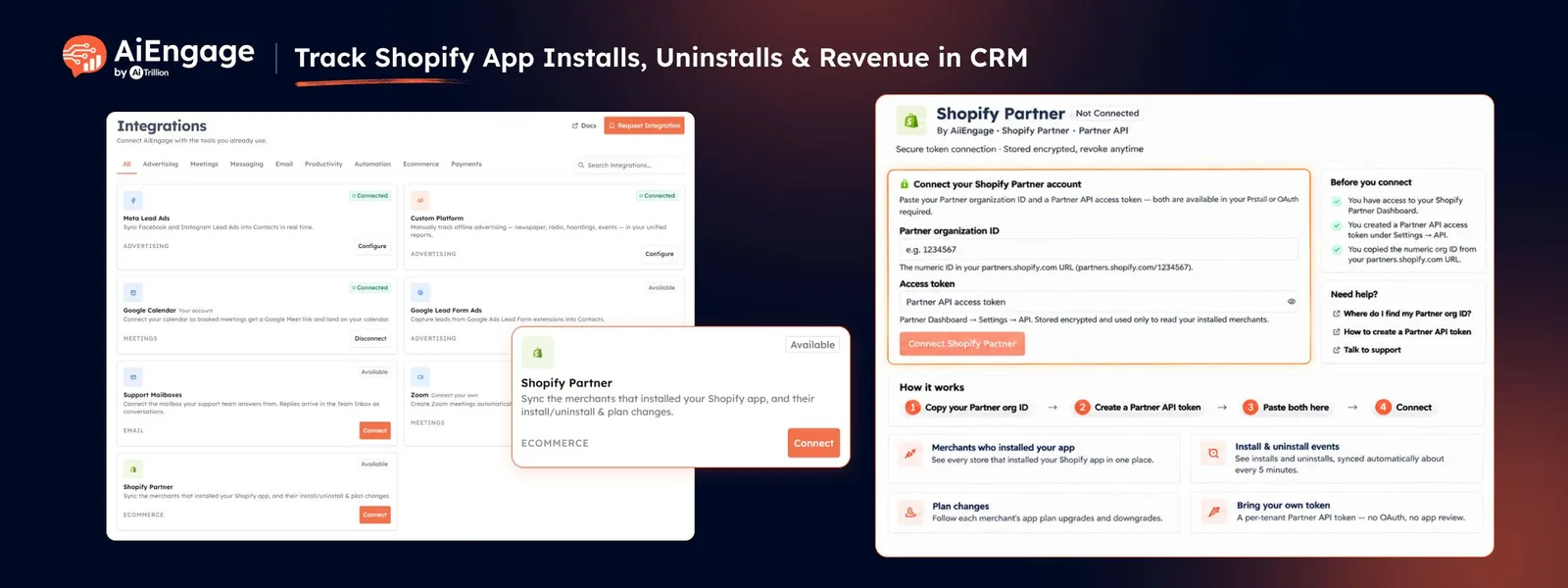
If you build apps for the Shopify App Store, you can now bring your Shopify merchants directly into AiEngage CRM.
With the new Shopify Partner Integration, every store that installs your app can be synced into CRM along with install and uninstall activity, plan details, billing information, MRR, and charge history.
The sync runs automatically about every 5 minutes, helping your team keep merchant data updated without manually importing it.
🆕 Features
Sync Shopify App Merchants into CRM
Connect your Shopify Partner organization and add the apps you want to track.
When a merchant installs your app, AiEngage CRM can create or update a Store record automatically.
You can track:
Store name
Domain
App
Install status
Install date
Uninstall date
Reinstall activity
Plan details
Billing information
MRR
Trial status
Payment history
Each store and app combination is maintained as its own record.
Track Installs, Uninstalls & Reinstalls
Merchant lifecycle activity can now stay updated inside CRM.
When a store:
Installs your app
Uninstalls your app
Reinstalls later
AiEngage updates the relevant Store record and keeps the previous activity available for your team.
This gives you a clearer view of active merchants, churned merchants, and returning customers.
Sync Plans, Billing & MRR
When a merchant subscribes or changes plans, AiEngage can update the Store record with relevant billing information.
This can include:
Billing period
Plan amount
MRR
Trial status
Trial end date
First payment date
Last payment date
Next payment date
Total amount received
This helps bring merchant lifecycle and revenue information into the same CRM your team already uses.
Track Every Shopify Charge
AiEngage creates a separate Store Transaction record for synced Shopify charges.
Transactions can include:
Recurring charges
One-time charges
Usage charges
Charge date
Amount
Currency
Plan
Store
Charge ID
Each transaction stays linked to the corresponding Store record, giving you a complete payment history for every merchant.
Automatically Create Stores & Store Transactions Modules
During setup, AiEngage can create two dedicated CRM modules:
Stores
Store Transactions
Stores contain merchant lifecycle and billing information, while Store Transactions keep a record of individual charges.
The Stores module can also be linked to your existing Contacts, allowing your team to connect merchant records with the people they work with.
Assign New Stores to Your Team
Decide who should own newly synced merchant records.
You can:
Assign every new store to a specific user.
Use round-robin assignment across a team.
With round-robin assignment, new stores can be distributed automatically among team members.
This makes it easier to route merchant onboarding, sales, retention, or support work to the right people.
Sync Your Full Merchant History
When you add an app, AiEngage can sync its historical merchant activity instead of starting only from the day the integration was connected.
Older installs, uninstalls, plan changes, and charges can also be brought into CRM.
This gives your team a more complete view of the app's merchant history from the start.
Keep Merchant Data Updated Automatically
After the initial sync, AiEngage continues checking Shopify Partner data automatically.
New installs, uninstalls, plan changes, and charges generally appear after the next sync cycle, which runs about every 5 minutes.
This helps reduce manual updates and keeps merchant records more current.
Monitor Sync Health & History
The Shopify Partner integration includes an Overview and Sync History so you can monitor the connection.
You can review:
Connection status
Store sync status
Last successful sync
Recent event counts
Failed syncs
Sync history
Error details
You can also filter sync history by date, status, store, or event.
Get Alerts When Sync Problems Happen
Admins can configure email alerts for integration issues.
Alerts can be sent when:
The Shopify access token is revoked or expires.
A store sync fails.
You can choose organization owners, authorized users, or additional email addresses as recipients.
Connect Multiple Shopify Partner Organizations
AiEngage CRM can connect up to 2 Shopify Partner organizations to one CRM account.
Both organizations can sync their merchants into the same Stores and Store Transactions setup.
This is useful for businesses managing multiple Shopify Partner accounts or app portfolios.
❤️ Why You’ll Love It?
Bring Shopify app merchants directly into CRM.
Track installs, uninstalls, reinstalls, plans, and billing.
Monitor MRR and total revenue from merchants.
Keep every charge connected to the right store.
Follow up with churned or uninstalled merchants.
Assign new merchants automatically to team members.
Build reports using synced store and transaction data.
Automate workflows around merchant activity.
Keep merchant data updated automatically.
Give sales, success, and support teams one shared merchant view.
🎯 Use Cases
Merchant Onboarding: Assign newly installed stores to a team member for onboarding and activation.
Uninstall Follow-Up: Filter uninstalled stores and create retention or win-back follow-ups.
Revenue Tracking: Monitor merchant MRR, plan value, payment history, and total amount received.
Trial Monitoring: Identify merchants currently on trial and track upcoming trial end dates.
Merchant Re-Engagement: Identify stores that reinstalled your app and reconnect with them.
App Performance Reporting: Compare installs, active stores, MRR, charges, and churn across different apps.
Team Assignment: Distribute new merchant records automatically using round-robin ownership.
Workflow Automation: Trigger CRM workflows based on synced store or billing information.
For more information, visit the AiEngage CRM Help Center or contact the AiEngage CRM support team.
New to AiEngage CRM? Sign Up