Make Business Calls Directly from the AiEngage App
You can now make and manage customer calls directly from the AiEngage mobile app.
Call from your own SIM number or use your company's AiEngage CRM number, then keep the call activity connected to the customer record so your team can see what happened and what needs to happen next.
🆕 Features
Call Customers Directly from the Mobile App
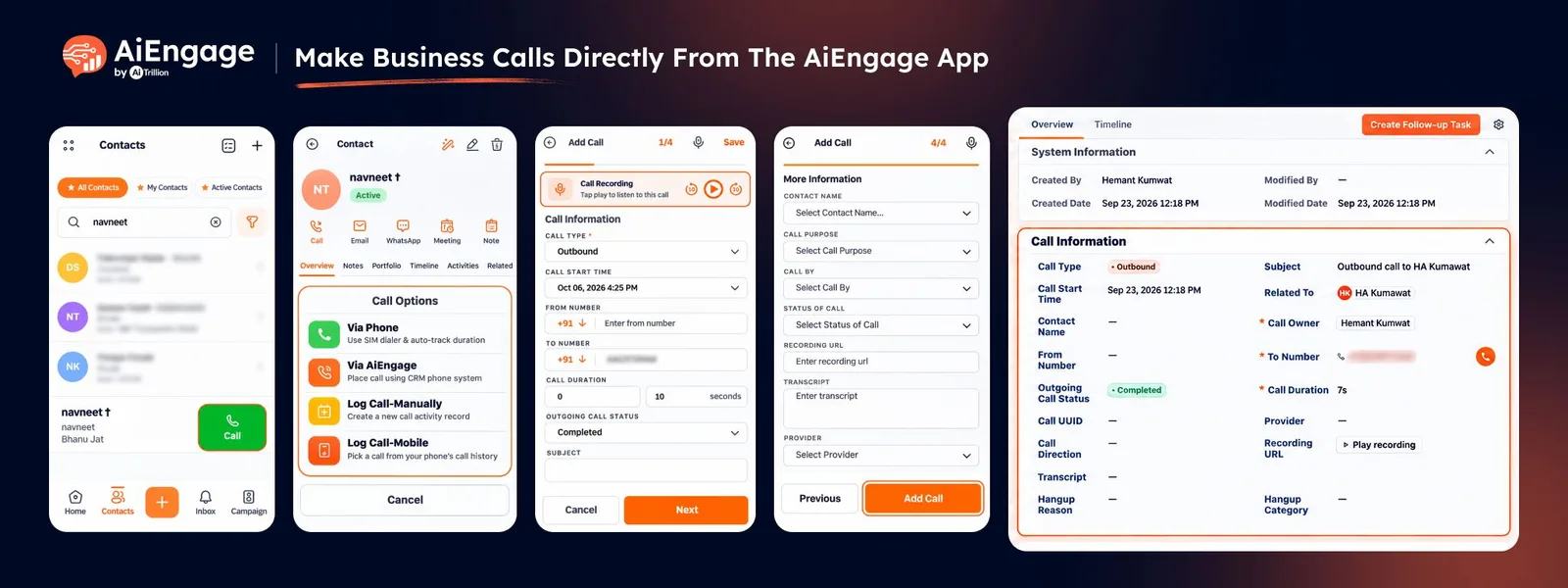
Open any contact in the AiEngage mobile app and start a call directly from their CRM record.
You can choose how you want to call:
Via Phone: Call using your own SIM number.
Via AiEngage: Call using your company's AiEngage CRM number.
Log Call-Manually: Add a call that already happened.
Log Call-Mobile: Pick a previous call from your phone's call history and save it to CRM.
Call Using Your Own Mobile Number
Use Via Phone when you want to call through your phone's normal dialer.
The customer sees your personal mobile number, while AiEngage helps you track the call and log it against the customer record.
After the call, you can save details such as:
Call duration
Call status
Outcome
Notes
Follow-up reminders
Call purpose
This keeps important customer calls connected to CRM even when they are made through your regular phone.
Call Using Your AiEngage Business Number
Use Via AiEngage to call customers through your company's connected CRM calling number.
This helps you keep your personal number private while making calls directly inside the app.
If your organization has multiple numbers, you can choose which business number should be used before placing the call.
Automatically Log AiEngage Calls
Calls made through Via AiEngage are automatically logged in the CRM.
Once the call ends, you can add your notes and next steps without manually creating a call record.
The call stays connected to the customer's record and can be reviewed later by your team.
Create Follow-Ups Right After the Call
After an AiEngage call ends, you can immediately create the next action.
Choose from:
Follow-up call
Meeting
Task
For example, you can create a task to send a quotation or schedule another call while the conversation is still fresh.
Log Calls You Already Made
Forgot to log a call?
You can now add previous calls to AiEngage CRM from the mobile app.
Use Log Call-Mobile to pick a call directly from your phone's recent call history. AiEngage can bring in details such as the call time and duration.
You can also use Log Call-Manually when the call was made from another phone, landline, or external device.
Keep Call Recordings in CRM
Calls made through AiEngage can be recorded when call recording is enabled for your organization.
The recording can then be accessed from the saved call record in CRM.
Your team can:
Open the call record.
Play the recording.
Review call details.
Access the transcript when transcription is enabled.
Keep Every Call Connected to the Customer Timeline
Logged calls appear on the customer's CRM timeline and in the Calls module.
This helps your team see:
Who called the customer.
When the call happened.
How long it lasted.
The call outcome.
Notes and follow-ups.
Recording and transcript when available.
This gives sales and support teams better visibility into customer communication.
❤️ Why You’ll Love It?
Make business calls directly from your mobile CRM.
Use your own number or your company's AiEngage number.
Keep personal numbers private when needed.
Log calls without waiting to get back to your laptop.
Save previous calls from your mobile call history.
Keep calls connected to customer records.
Create follow-ups immediately after a call.
Store recordings and transcripts when enabled.
Give the team better visibility into customer conversations.
🎯 Use Cases
Sales Calls on the Move: Call prospects from the mobile app while travelling or working outside the office.
Keep Your Number Private: Use your company's AiEngage number instead of your personal mobile number.
Post-Call Follow-Ups: Create a task, meeting, or callback immediately after the conversation.
Call Logging: Save previous calls from your phone history into CRM.
Call Recording Review: Listen to important customer conversations later from the CRM.
Team Visibility: Keep call activity visible to other team members through the customer timeline.
For more information, visit the AiEngage CRM Help Center or contact the AiEngage CRM support team.
New to AiEngage CRM? Sign Up