Create Date-Based Automations in CRM
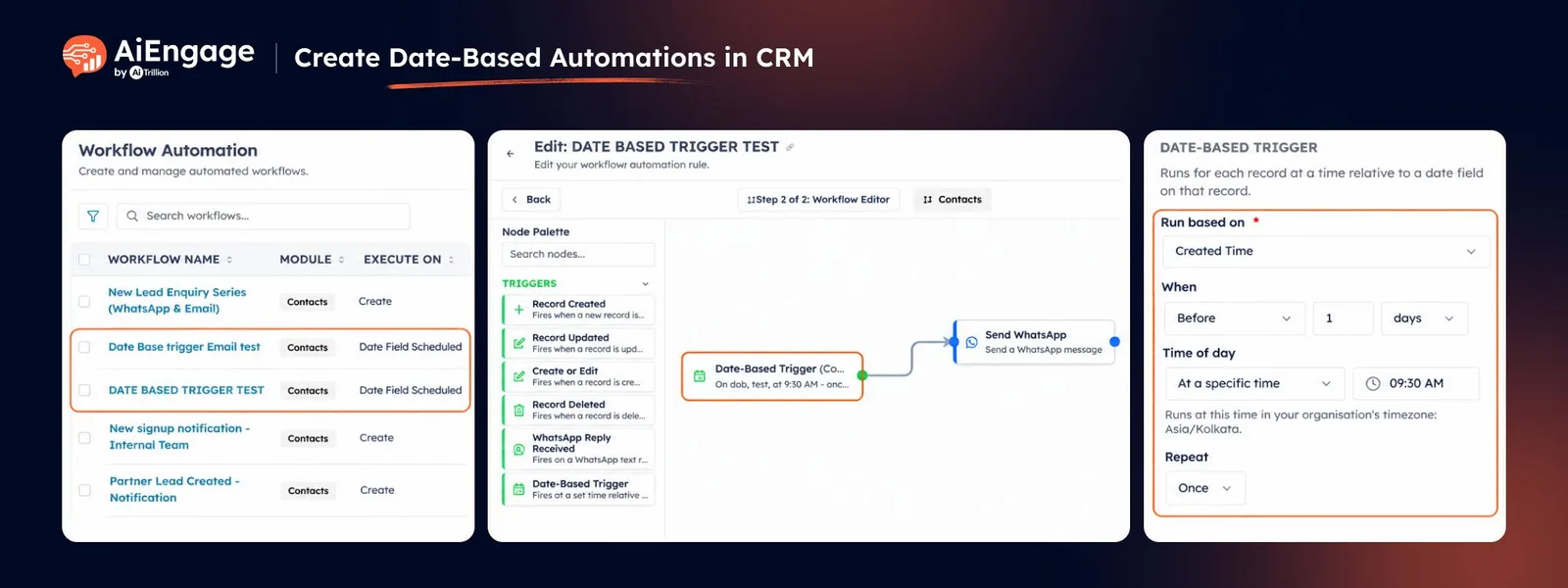
You can now run workflows based on dates stored inside your CRM records. With the new Date-Based Trigger in Workflow Automation, AiEngage CRM can automatically run a workflow on a specific date, before that date, or after it.
This makes it easier to automate birthdays, renewals, payment reminders, follow-ups, anniversaries, trial expiries, and other date-driven processes without manually tracking them.
🆕 Features
Run Workflows Based on Any Date Field
Choose any supported Date or Date-Time field from the selected CRM module and use it to trigger your workflow.
For example:
Date of Birth
Renewal Date
Payment Due Date
Site Visit Date
Created Date
Last Activity Date
Each record can run the workflow based on its own date.
Run Before, On, or After the Date
You can decide exactly when the workflow should run relative to the selected date.
Choose:
On the date
Before the date
After the date
You can also specify the number of days before or after the selected date.
For example:
Send a birthday message on the customer's birthday.
Send a renewal reminder 30 days before renewal.
Send a follow-up 1 day after a site visit.
Choose the Time of Day
Set the exact time when the workflow should run.
You can choose:
A specific time such as 9:00 AM.
The same time stored in a Date-Time field.
The workflow runs based on your organization's configured timezone.
Create Recurring Date-Based Workflows
Date-based workflows can run once or repeat automatically.
You can repeat workflows every:
Week
Month
Year
Recurring schedules can end on a selected date or after a specific number of runs.
This is useful for recurring events such as birthdays, annual renewals, monthly payment reminders, or regular follow-ups.
Run Workflows for Existing or New Records
Choose whether the date-based workflow should apply to:
Only new records created after the workflow is saved.
Existing records already in your CRM as well as new records.
This gives you control over whether current customer data should be included in the automation.
Add Conditions to Control Which Records Run
You can add conditions to make sure the workflow runs only for the right records.
For example:
Only customers with an email address.
Only active customers.
Only deals in a specific stage.
Only records matching a selected status.
You can add up to 5 conditions and choose whether all or any of them must match.
See a Clear Schedule Summary Before Saving
AiEngage CRM shows a simple summary of the date-based schedule you configured.
You can quickly review:
The selected date field.
When the workflow will run.
The time.
Repeat settings.
Whether existing records are included.
Applied conditions.
This helps you check the schedule before activating the workflow.
Combine Date Triggers with Workflow Actions
Once the date trigger is configured, you can connect it with other workflow actions.
For example:
Send Email
Send WhatsApp
Update Field
Create Record
Assign Owner
Trigger Webhook
Add Wait or Delay steps
This allows you to build complete date-driven automation flows inside AiEngage CRM.
❤️ Why You’ll Love It?
Automate follow-ups based on important CRM dates.
Reduce manual reminders and calendar tracking.
Run personalized actions for every record on its own date.
Create recurring birthday, renewal, or payment workflows.
Trigger communication before or after important events.
Control which CRM records enter the workflow.
Build complete date-driven automations with email, WhatsApp, field updates, and more.
🎯 Use Cases
Birthday & Anniversary Messages: Automatically send greetings on important customer dates.
Renewal Reminders: Notify customers or your team before subscriptions, contracts, or memberships expire.
Payment Reminders: Send reminders a few days before a payment due date.
Trial Expiry Follow-Ups: Contact prospects before or after their free trial ends.
Site Visit Follow-Ups: Automatically send a follow-up after a scheduled visit.
Meeting & Appointment Reminders: Trigger communication based on appointment dates.
Annual Customer Follow-Ups: Create recurring yearly workflows for customer engagement.
Internal Task Automation: Update fields, assign owners, or create records when a specific date arrives.
For more information, visit the AiEngage CRM Help Center or contact the AiEngage CRM support team.
New to AiEngage CRM? Sign Up