Create Meetings, Generate Links & Notify Customers Automatically
What if your team could create a meeting in AiEngage CRM and have everything else handled automatically?
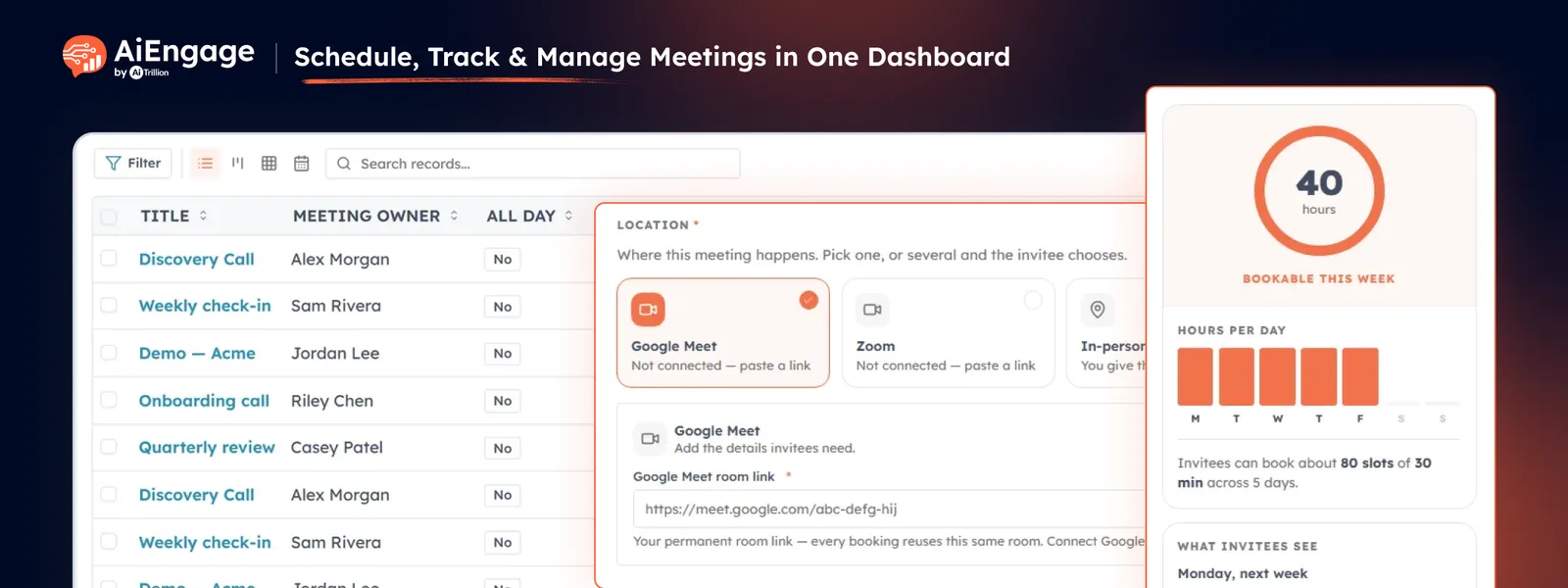
With the new Zoom & Google Meet integration, your team can now create an online meeting directly from AiEngage CRM. When you create a meeting, AiEngage automatically creates it in the connected Zoom or Google Meet account, generates the meeting link, and emails the customer the meeting details and joining link.
No need to create the meeting separately, copy the meeting link, or manually email it to the customer.
🆕 Features
Create Zoom & Google Meet Meetings Directly from AiEngage CRM
You can now connect your Zoom or Google Meet account with AiEngage CRM and create online meetings directly while scheduling a CRM meeting.
Simply select your preferred meeting platform and create the meeting. AiEngage CRM takes care of the rest.
Connect your Zoom account.
Connect your Google Meet account.
Select Zoom or Google Meet while creating a meeting.
Automatically create the meeting on the connected platform.
Automatically generate the meeting joining link.
Save the meeting link with the CRM meeting.
Keep the meeting connected to the customer and CRM record.
Your team no longer needs to open Zoom or Google Meet separately to create the meeting and then copy the link back into the CRM.
Automatically Generate & Share the Meeting Link
Once you create a meeting in AiEngage CRM, the system automatically generates the appropriate meeting link through the connected platform.
The generated link stays available inside the CRM meeting, making it easy for your team to access and share whenever needed.
This removes the manual steps of:
Create Meeting → Open Zoom/Meet → Create Meeting → Copy Link → Add Link to CRM → Send to Customer
Instead, AiEngage CRM handles the process automatically.
Create Meeting → Meeting Link Generated → Customer Notified
Automatically Notify Customers by Email
Once the meeting is created and the meeting link is generated, AiEngage CRM can automatically send the customer an email containing the meeting details and joining link.
Customers can receive the information they need to join the meeting without your team having to manually prepare and send an email.
The notification can include:
Meeting title.
Meeting date and time.
Meeting details.
Meeting platform.
Meeting joining link.
This helps ensure customers receive the meeting information immediately after the meeting is scheduled.
Keep Meetings Connected to Your CRM
Although the meeting is created on Zoom or Google Meet, your team can continue managing the meeting from AiEngage CRM.
The meeting remains connected with:
Customer/contact.
Meeting owner.
Internal participants.
Meeting status.
Related CRM record.
Meeting date and time.
Zoom or Google Meet joining link.
This gives your team a complete view of the meeting without switching between multiple platforms.
Host One-to-One & Group Meetings
Create meetings for individual customers or multiple participants directly from AiEngage CRM.
Schedule one-to-one customer meetings.
Organize group meetings.
Add internal team members.
Add CRM contacts.
Assign a meeting owner.
Use Zoom or Google Meet for online meetings.
Meeting Transcripts & AI Summaries
After the meeting, your team can keep the meeting context connected with the CRM. Meeting transcripts and AI-generated summaries can help capture key discussion points, customer requirements, decisions, follow-ups, and next steps.
Your team can quickly understand what happened without going through the entire conversation again.
Create Custom Kanban Views for Your Team
Not every team tracks meetings in the same way. A sales team may want to see meetings by status, while a customer success team may organize them by stage.
AiEngage CRM lets you create custom Kanban views around the way your team works.
You can choose:
Kanban view name.
The picklist field used to categorize meetings.
An optional field for aggregation.
The primary card title.
Which meeting fields appear on every card.
The order in which those fields appear.
Whether the view stays private or is shared with everyone.
Import Meeting History & Notes
Bring your existing meeting records and notes into AiEngage CRM so valuable customer context is not lost during migration.
Import past meetings and notes.
Track import status and progress.
Search previous imports easily.
Keep historical customer conversations connected to the CRM.
❤️ Why You’ll Love It
Create Meetings from One Place: schedule your Zoom or Google Meet meeting directly from AiEngage CRM.
Automatic Meeting Creation: the meeting is automatically created in your connected Zoom or Google Meet account.
Automatic Meeting Links: the joining link is generated automatically and saved with the CRM meeting.
Automatic Customer Notifications: send customers the meeting details and joining link by email without manual work.
No More Copy-Pasting: eliminate the need to create meetings separately and manually copy links into your CRM.
Better Customer Experience: customers receive the meeting information and joining link as soon as the meeting is scheduled.
Complete CRM Context: keep the customer, meeting, owner, participants, status, and meeting link connected in one place.
Less Manual Work: let AiEngage CRM handle the repetitive steps so your team can focus on the customer.
🎯 Use Cases
Sales Demos: schedule a demo in AiEngage CRM, automatically create the Zoom or Google Meet meeting, and send the prospect the joining link.
Customer Onboarding: schedule onboarding sessions and automatically share the meeting details with customers.
Discovery Calls: create discovery meetings and let AiEngage CRM handle the meeting creation and customer notification.
Consultations: schedule customer consultations without manually creating and sharing online meeting links.
Team Meetings: create group meetings with internal participants and customers from one CRM record.
Follow-Up Meetings: schedule the next customer meeting and automatically send the joining details.
Recurring Meetings: manage recurring customer meetings while keeping the meeting information connected to the CRM.
For more details on enabling and using this feature, visit our Help Center or contact our support team.
New to AiEngage CRM? Sign Up